[onpage_seo_checker]
Search engine optimization has evolved far beyond keywords and backlinks. Today, on-page SEO plays a critical role in determining whether your content ranks, gets indexed properly, and attracts clicks from search results. This is where an On-Page SEO Checker Tool becomes essential.
In this detailed guide, you’ll learn what an On-Page SEO Checker Tool is, why it matters, how it works, what factors it analyzes, and how to use it effectively to improve your website’s search performance.
What Is an On-Page SEO Checker Tool?
An On-Page SEO Checker Tool is a web-based utility that analyzes individual web pages to evaluate how well they are optimized for search engines. It scans the page’s HTML, content structure, and metadata to identify SEO strengths, weaknesses, and opportunities for improvement.
Unlike general SEO audit tools that analyze entire websites, an on-page checker focuses on single-page optimization, which is crucial because Google ranks pages, not websites.
Why On-Page SEO Still Matters in 2026
Despite advances in AI, machine learning, and semantic search, on-page SEO remains one of the strongest ranking signals.
Here’s why:
-
Search engines need clear signals to understand page intent
-
Proper HTML structure improves crawlability
-
Well-optimized titles and descriptions increase CTR
-
Clean on-page SEO reduces indexing issues
-
On-page optimization aligns content with user intent
Even the best backlinks cannot compensate for poorly optimized pages.
What Does an On-Page SEO Checker Tool Analyze?
A high-quality On-Page SEO Checker Tool evaluates multiple SEO elements that directly impact rankings and user experience.
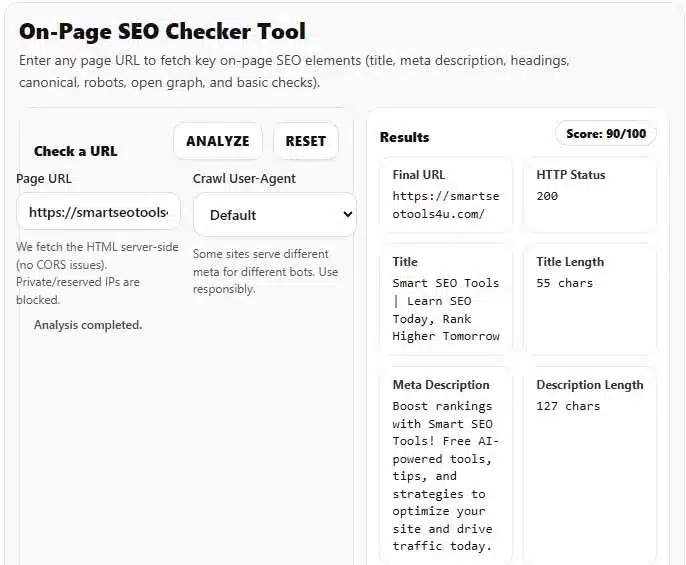
1. Title Tag Analysis
The title tag is one of the most important on-page ranking factors.
An On-Page SEO Checker Tool checks:
-
Whether a title tag exists
-
Title length (optimal range)
-
Keyword usage
-
Duplicate or missing titles
A good title is concise, descriptive, and written for humans—not stuffed with keywords.
2. Meta Description Evaluation
While meta descriptions are not a direct ranking factor, they strongly influence click-through rate (CTR).
The tool checks:
-
Presence of meta description
-
Character length
-
Relevance to page content
-
Potential truncation risks
A compelling description improves visibility and engagement in search results.
3. URL Structure & Canonical Tags
Clean URLs help both users and search engines.
An On-Page SEO Checker Tool identifies:
-
Canonical tag presence
-
Canonical URL correctness
-
Duplicate URL risks
-
URL readability
Canonical tags are especially important for avoiding duplicate content issues.
4. Heading Structure (H1–H6)
Headings define content hierarchy.
The tool checks:
-
H1 presence and count
-
Multiple H1 issues
-
H2 and H3 usage
-
Structural clarity
A well-structured heading hierarchy improves content readability and SEO relevance.
5. Robots Meta Tags
Robots meta tags control how search engines treat a page.
The checker detects:
-
noindex
-
nofollow
-
index, follow directives
Accidentally blocking indexing is one of the most common SEO mistakes—and one of the easiest to fix.
6. Open Graph & Social Meta Tags
While social meta tags don’t directly affect rankings, they influence content sharing and visibility.
An On-Page SEO Checker Tool reviews:
-
og:title
-
og:description
-
og:type
-
Social sharing readiness
Better social previews lead to higher engagement and indirect SEO benefits.
7. Viewport & Mobile Optimization
Mobile-first indexing is now standard.
The tool checks:
-
Viewport meta tag
-
Mobile responsiveness signals
-
Basic mobile compatibility issues
A missing viewport tag can severely impact mobile rankings.
8. HTML Language Attribute
The lang attribute helps search engines understand language and region targeting.
The checker verifies:
-
Presence of
langattribute -
Correct language code usage
This improves accessibility and international SEO accuracy.
9. Content Length & Readability Signals
While content quality is subjective, an On-Page SEO Checker Tool can identify:
-
Very thin content
-
Missing core elements
-
Structural weaknesses
It doesn’t judge creativity—but it flags technical weaknesses.
How an On-Page SEO Checker Tool Works
Most on-page SEO tools follow a similar process:
-
Fetch the page HTML server-side
-
Parse the DOM structure
-
Extract SEO elements
-
Evaluate them against best practices
-
Generate insights and recommendations
Modern tools avoid browser-based fetching to bypass CORS issues and ensure accurate analysis.
Benefits of Using an On-Page SEO Checker Tool
Saves Time
Manual SEO audits are slow and error-prone. Automation speeds up analysis.
Improves Rankings
Fixing on-page issues sends stronger relevance signals to search engines.
Increases Click-Through Rate
Optimized titles and descriptions attract more clicks.
Prevents Indexing Mistakes
Early detection of noindex or canonical errors protects visibility.
Ideal for Bloggers & Content Creators
Writers can validate SEO before publishing.
Who Should Use an On-Page SEO Checker Tool?
This tool is valuable for:
-
Bloggers
-
Affiliate marketers
-
SEO professionals
-
Website owners
-
Freelancers
-
Content strategists
-
WordPress users
Whether you manage one blog or hundreds of pages, on-page analysis is non-negotiable.
Free vs Paid On-Page SEO Checker Tools
Free Tools
-
Best for beginners
-
Quick analysis
-
Limited depth
-
No API costs
Paid Tools
-
Advanced metrics
-
Bulk analysis
-
Integrations
-
Historical tracking
A well-built free On-Page SEO Checker Tool can still deliver excellent value for daily use.
Common On-Page SEO Mistakes This Tool Helps Identify
-
Missing title tags
-
Duplicate meta descriptions
-
Multiple H1 tags
-
No canonical URLs
-
Accidental noindex tags
-
Thin content pages
-
Poor heading structure
Fixing these issues often leads to noticeable ranking improvements.
How to Use an On-Page SEO Checker Tool Effectively
-
Enter the full page URL
-
Run the analysis
-
Review detected issues
-
Prioritize critical errors first
-
Update the page
-
Re-check after publishing
SEO is iterative—optimization is never “one and done.”
On-Page SEO vs Technical SEO
While related, they are different:
| On-Page SEO | Technical SEO |
|---|---|
| Content-focused | Infrastructure-focused |
| Page-level | Site-level |
| Titles, headings | Crawlability |
| Meta tags | Page speed |
| User intent | Indexing |
An On-Page SEO Checker Tool focuses specifically on content-level optimization.
Why On-Page SEO Tools Are Essential for AI Search
With AI-driven search results, content clarity matters more than ever.
Search engines prioritize:
-
Clear intent
-
Structured content
-
Semantic relevance
On-page optimization helps AI understand your content contextually, not just keyword-wise.
Best Practices for On-Page SEO Optimization
-
Write titles for humans first
-
Match content with search intent
-
Use headings logically
-
Avoid keyword stuffing
-
Keep URLs short and clean
-
Always set canonicals
-
Test pages before publishing
A reliable On-Page SEO Checker Tool helps enforce these best practices consistently.
Final Thoughts
An On-Page SEO Checker Tool is no longer optional—it’s a core requirement for anyone serious about organic traffic.
Search engines reward clarity, structure, and relevance. By analyzing and fixing on-page SEO issues, you create pages that are easier to crawl, easier to understand, and more attractive to users.
Whether you’re optimizing a blog post, landing page, or affiliate article, on-page SEO is the foundation that supports all other SEO efforts.
Use an On-Page SEO Checker Tool regularly, refine your content thoughtfully, and let data guide your optimization decisions.